Load Balancer
A load balancer is one of the most foundational building blocks in distributed systems. It will be implemented between clients and backend services. which is used to spreads incoming traffic across a multiple microservices.
1. Why do we need Load Balancer
Imagine we have a web application with just one server and every user request hits the same server. This single server has few fundamental issues:
- Single point of failure: If the server crashes, you entire application goes down.
- Limited scalability: A single server can only handle so many requests before it becomes overloaded.
- Poor Performance: As traffic increases response times degrade for all users.
- No Redundancy: Hardware failures, software bugs, or maintenance windows cause complete outages.
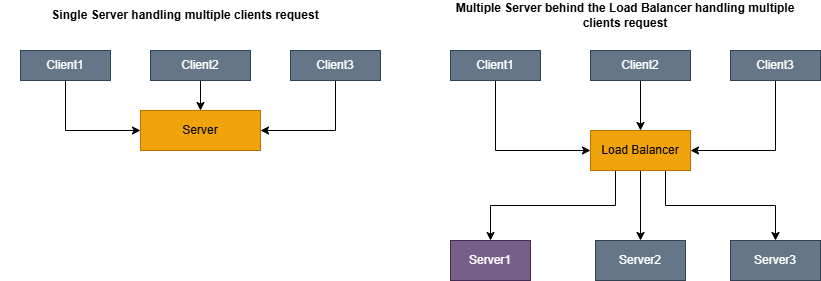
Load balancer will help with below benefits:
- High Availability: If one server fails, traffic is automaticaaly routed to healthy servers.
- Horizontal Scalability: You can add more servers to handle increases load.
- Better Performance: Requests are distributed, so no singleserver is overwhelmed.
- Zero-Downtime Deployments: You can take servers out of rotation for maintenance without affecting users.
2. Load Balancing Algorithms
The load balancer uses Algorithms to distribute the incoming requests. Each Algorithm has different characteristics and is suited for different scenarios.
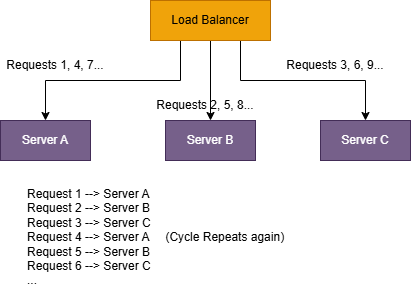
2.1 Round Robin:
Round robin is a simplest algorithm using this the incoming requests are evenly distributed across all the
available server in round robin fassion.
- Simple to implement
- Works well when all servers have equal capacity
- Predictable distribution
Pros:
- Does not account for server load or capacity differences
- A slow request on one server does not affect the distribution
Cons:
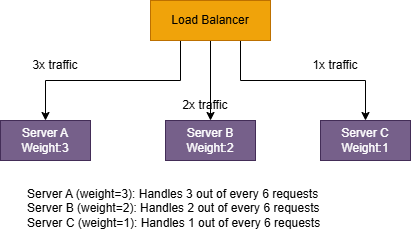
2.2 Weighted Round Robin:
This ia an extension of Round robin where servers are assigned Weighted bases on their capacity.
- Still simple
- better for mixed instance sizes like 2 vCPU + 4 vCPU + 8 vCPU
Pros:
- Still not load-aware in real time
- If one server becomes slow (GC pause, noisy neighbour, warm cache vs Cold cache), it will still get its scheduled share.
Cons:
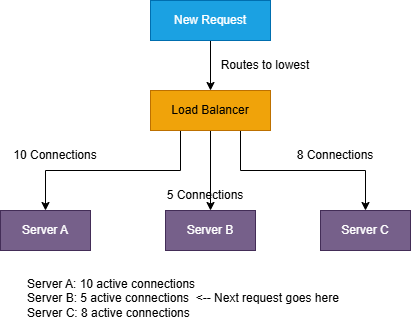
2.3 Least Connections:
Routes requests to the server with the fewest active connections. This algorithm is dynamic, it considers
the current state of each server rather
than using a fixed rotation.
- Adapts to varifing request processing times
- Naturally balances load when some requests take longer than others
Pros:
- Requires tracking connection counts for each server
- Slightly more overhead than Round Robin
Cons:
2.4 Weighted Least Connections:
Combines Least Connections with server weights. The algorithm considers both the number of active
connections and the server’s capacity.
                        Server A: 10 connections, weight 5 → Score = 2.0
                        Server B: 6 connections, weight 2  → Score = 3.0
                        Server C: 4 connections, weight 1  → Score = 4.0
                        Next request goes to Server A (lowest score)
- Works well for mixed instance sizes
- mixed request durations and More robust than either “weighted” or “least connections” alone.
Pros:
- Needs reliable tracking + weight tuning
- Still uses connections as a proxy for load (not always perfect).
Cons:
2.5 IP Hash:
The client’s IP address is hashed to determine which server handles the request. The same client IP always
goes to the same server.
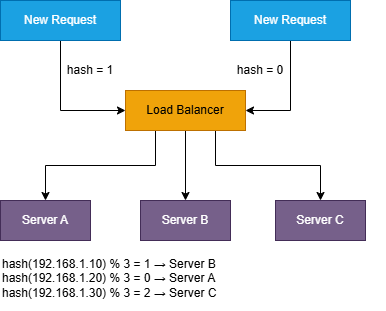
- Simple session persistence without cookies
- No additional state to track.
Pros:
- Uneven distribution if IP addresses are not uniformly distributed
- Server additions/removals cause redistribution of clients.
Cons:
2.6 Least Response Time:
Routes requests to the server with the fastest response time and fewest active connections.
The load balancer continuously measures:
- 1. Average response time for each server
- 2. Number of active connections
- Optimizes for perceived performance
- Can avoid slow/unhealthy servers before they fully fail
Pros:
- Highest operational complexity (needs continuous measurement and smoothing)
- Can “overreact” to noise without careful tuning (feedback loops)
- Requires good metrics and stable observation windows
Cons:
3. Layer 4 vs Layer 7 Load Balancing
Load balancers operate at different layers of the OSI model, and this determines what information they can use to make routing decisions.
In practice, this usually comes down to two common modes:
- 1. Layer 4 (Transport): routes based on IPs/ports and the transport protocol (TCP/UDP)
- 2. Layer 7 (Application): routes based on HTTP/HTTPS request details (path, headers, cookies, etc.)
3.1 Layer 4 (Transport Layer)
A Layer 4 load balancer operates at the TCP/UDP level. It does not understand HTTP paths, headers, or payloads. It only sees network and transport metadata such as:
- 1. Source IP address
- 2. Destination IP address
- 3. Source port
- 4. Destination port
- 5. Protocol (TCP/UDP)
- 1. The client opens a TCP connection to the load balancer (e.g., :443).
- 2. The load balancer chooses a backend server (Server 1 or Server 2).
- 3. It forwards packets to that backend.
- 4.That connection stays pinned to the chosen backend for the lifetime of the TCP session.
- Very fast: no request parsing, no payload inspection.
- Efficient: lower CPU/memory overhead.
- Protocol-agnostic: works for any TCP/UDP traffic (HTTP, TLS, gRPC, MQTT, custom protocols).
- No content-based routing: can’t do /api/* vs /images/*.
- Limited app visibility: doesn’t know response codes, URL patterns, user sessions, etc.
- Harder to do “smart” behaviors that require HTTP awareness.
3.2 Layer 7 (Application Layer)
A Layer 7 load balancer understands HTTP/HTTPS. It can inspect each request and route based on application-level information like:
- 1. HTTP method (GET, POST, …)
- 2. URL path and query parameters (/api/users?id=7)
- 3. HTTP headers (Host, Authorization, Cookie, User-Agent, …)
- 4. Sometimes the request body (with caveats)
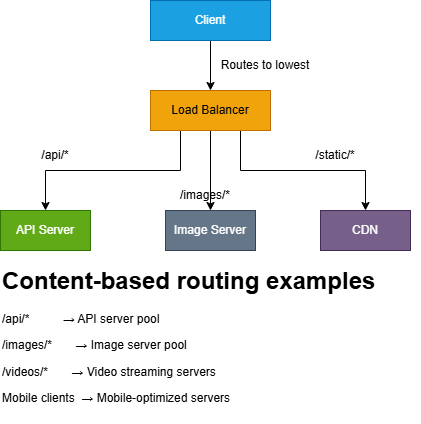
Layer 7 is especially useful when your “backend” isn’t one pool of identical servers, but a set of specialized services.
Pros:
- Smart routing: based on path, headers, cookies, hostnames.
- Better visibility: can observe HTTP status codes, latency, retries, error rates.
- Can transform traffic: header injection, redirects, rewrites (depending on product).
- Commonly supports TLS termination: decrypt at the LB, forward plain HTTP internally (or re-encrypt).
- More overhead: must parse HTTP (and sometimes decrypt TLS first).
- Higher latency: usually small, but measurable at high scale.
- Protocol-specific: primarily for HTTP/HTTPS traffic.
4. Health Checks and Failover
A load balancer is only useful if it can avoid sending traffic to broken servers. If it keeps routing requests to a dead instance, users will see timeouts, 5xx errors, and intermittent failures that are hard to debug.
That’s why every serious load balancer has two jobs:
- 1. Detect health (which servers are safe to send traffic to)
- 2. Fail over (stop routing to unhealthy servers, and bring them back safely once recovered)
4.1 Types of Health Checks
Health checks come in two broad flavors: passive (observe real traffic) and active (send probes). Most production setups use a combination.
Passive Health Checks
-
The load balancer monitors actual traffic to detect failures. If Server A returns 5xx errors for 3
consecutive requests
- → Mark Server A as unhealthy
- → Stop sending traffic to Server A
- No extra “probe” traffic
- Detects failures that matter to users (real request paths)
- You only detect issues after users are already impacted
- Can be noisy: a few bad requests might be app-level bugs, not server death
- Doesn’t help much when traffic is low (nothing to observe)
Active Health Checks
-
The load balancer periodically sends probe requests to each server, independent of user traffic.
- 1. GET /health every 10 seconds
- 2. If probes fail repeatedly, the server is remved from rotation. This catches failures before they hit users (or at least reduces blast radius quickly).
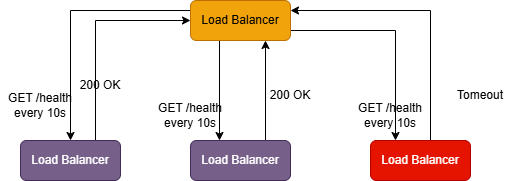
Example:
-
TCP Health Checks
-
The load balancer checks whether it can open a TCP connection to a port.
Good for: basic liveness (“is the process listening?”)Can I connect to Server A on port 8080? → Yes: Server is healthy → No: Server is unhealthy
Blind spot: the app may accept TCP but still be broken internally (DB down, stuck threads). -
HTTP Health Checks
The load balancer sends an HTTP request to a known endpoint and validates the response.Good for: verifying the app can actually serve HTTP and respond quickly.GET /health HTTP/1.1 Host: server-a.internal Expected response: - Status code: 200 - Body contains: "OK" - Response time: < 500ms -
Application-Level Health Checks
A richer endpoint that checks internal dependencies and returns structured status.GET /health { "status": "healthy", "checks": { "database": "healthy", "cache": "healthy", "external_api": "degraded" }, "timestamp": "2024-01-15T10:30:00Z" }
4.2 Failover Process
Failover is what happens after health checks decide a server is unhealthy.
-
Removing an unhealthy server (fail-out)
Once a server crosses the unhealthy threshold, the load balancer: - 1. marks it unhealthy
- 2. stops sending it new traffic
- 3. continues sending traffic only to healthy servers Example Timeline:
-
Bringing a server back (recovery / fail-in)
After the server is fixed, it shouldn’t immediately receive full traffic (to avoid instant re-failure). With a healthy threshold of 2::Many systems also use slow start / ramp-up, gradually increasing traffic to a recovered server so it can warm caches and stabilize....Server C is fixed... 05:00 - Health check succeeds 05:10 - Second health check succeeds → Server C marked healthy 05:10 - Server C rejoins the pool
                          00:00 - Server C fails to respond to health check
                          00:10 - Second health check fails
                          00:20 - Third health check fails → Server C marked unhealthy
                          00:20 - All new traffic goes to Servers A and B only
5. Session Persistence (Sticky Sessions)
By default, a load balancer may send each request from the same user to a different backend server. That’s
usually fine for stateless services
but it breaks quickly if your application stores session data in-memory on the server.
Example failure mode:
                        Request 1: User logs in → Server A (session created)
                        Request 2: User views profile → Server B (no session found!)
                        Request 3: User logs in again → Server C (another session created)
5.1 Methods of Session Persistence
There are a few common ways to achieve stickiness, each with different trade-offs.
Cookie-Based Persistence
The load balancer sets a cookie identifying which server the client should use.
How it works:
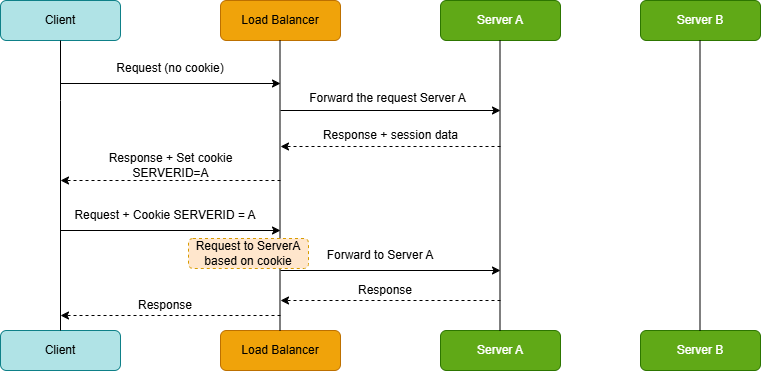
- On the first request, the load balancer selects a backend (say, Server A).
- The response includes a cookie that encodes the “chosen backend”.
- On subsequent requests, the client sends that cookie back.
- The load balancer uses the cookie to route the request to the same server.
-
Cons
- Ties users to a specific server, reducing flexibility
- If the cookie is not handled carefully, it can become a security or operability risk (tampering, leakage, etc.)
- Doesn’t help for non-HTTP protocols
IP-Based Persistence
Use the client’s IP address to consistently route to the same server (same as IP Hash algorithm).
-
Pros
- Simple
- No cookies required
-
Cons
- NAT and proxies: many users can appear from the same IP (corporate networks, mobile carriers)
- Adding/removing servers can reshuffle mapping and break stickiness
- Client IP may be masked by CDNs, proxies, or gateways unless forwarded correctly
Application-Controlled Persistence
The application explicitly indicates the sticky target via a header or cookie, and the load balancer respects it.
Example:
- Response header: X-Sticky-Server: server-a-pod-xyz
5.2 Problems with Sticky Sessions
Sticky sessions solve one problem, but they create new ones.
- Uneven load distribution: If a few users generate heavy traffic, and they’re pinned to the same backend, that server becomes hot while others stay underutilized.
- Failover becomes user-visible: If Server A dies, every user pinned to A may lose their session and get forced to re-authenticate (unless the app has other recovery mechanisms).
- Scaling helps less than you expect: When you add new servers, existing users remain pinned to old ones. So the new capacity primarily benefits new users, not the current load distribution.
5.3 Better Alternative: Externalized Sessions
Instead of keeping sessions in server memory, store session state in a shared external store. Then any server can handle any request.
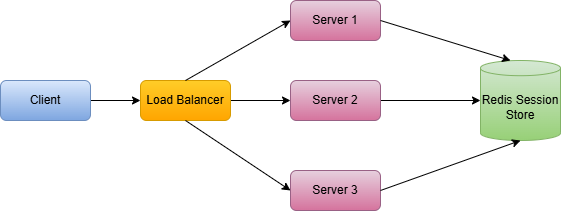
With externalized sessions:
- Any backend can serve any request (no affinity required)
- Server failures don’t wipe sessions
- Horizontal scaling becomes clean and predictable
- Deployments become simpler (no special draining logic for “pinned” users)
Popular session stores: Redis (very common), Memcached, DynamoDB
Key point: Sticky sessions are often a tactical fix. Externalizing sessions is usually the strategic solution especially once you care about reliability, autoscaling, and smooth deployments.
6. SSL/TLS Termination
HTTPS is non-negotiable on the modern internet but TLS handshakes and encryption are not free. They cost CPU, add latency, and require careful certificate management.
Load balancers often take on this work so your application servers can focus on business logic.
There are three common patterns:
6.1 TLS Termination at Load Balancer
The client connects to the load balancer over HTTPS. The load balancer decrypts the traffic and forwards it to backends as plain HTTP.
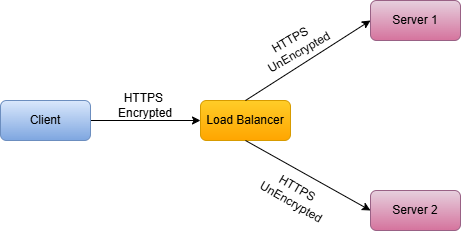
-
Pros:
- Reduces CPU load on application servers
- Centralized certificate management
- Easier to inspect and modify traffic
-
Cons:
- Traffic between load balancer and servers is unencrypted
- Requires trusting the internal network
6.2 TLS Passthrough
The load balancer does not decrypt TLS. It forwards the encrypted bytes to a backend, and the backend
terminates TLS.
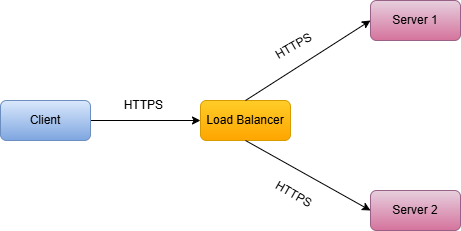
-
Pros:
- End-to-end encryption
- No certificate management at load balancer
-
Cons:
- Cannot inspect or modify traffic (Layer 4 only)
- Each server must handle SSL/TLS
6.3 TLS Re-encryption
The load balancer decrypts traffic, applies L7 routing/inspection, then re-encrypts before forwarding to backends.
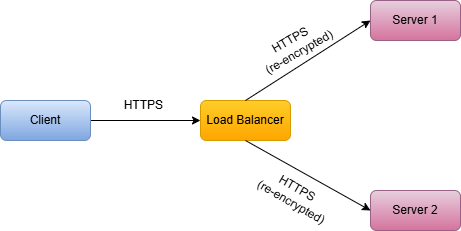
-
Pros:
- End-to-end encryption
- Can still inspect and route based on content
-
Cons:
- Double encryption/decryption overhead
- More complex certificate management
More complex certificate management
7. High Availability for Load Balancers
A load balancer improves availability for your backend servers but it also introduces a new risk: If you deploy one load balancer and it fails, your entire service becomes unreachable.
So the question becomes: how do we make the load balancer itself highly available?
There are three common approaches:
7.1 Active-Passive (Failover)
Two load balancers are deployed: one active, one standby. If the active fails, the passive takes over.
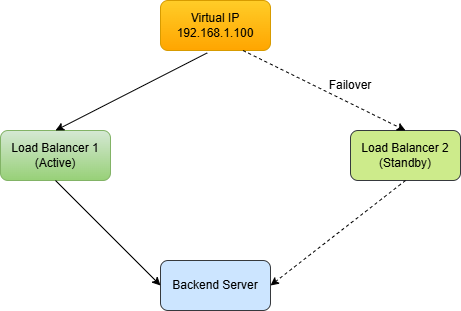
The two load balancers share a Virtual IP (VIP). When the active fails, the standby claims the VIP.
How failover is typically implemented
- VRRP (Virtual Router Redundancy Protocol)
- Keepalived (common Linux tool that uses VRRP)
- Heartbeats between LBs to detect failure quickly
-
Pros:
- Easier to reason about
- Works well for on-prem / self-managed environments
-
Cons:
- The standby is mostly idle (wasted capacity)
- Failover is not instant (there’s always a detection + takeover window)
- You still need to design for state: if the active LB held session affinity state, failover may break stickiness unless state is shared
7.2 Active-Active
In active-active mode, both load balancers handle traffic simultaneously. DNS or an upstream router distributes traffic between them.
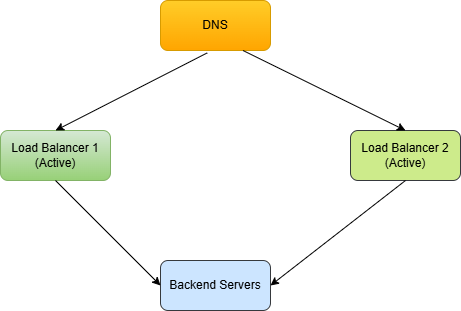
-
Pros:
- Better resource utilization (no idle standby)
- Higher total capacity (you scale the LB tier horizontally)
- Often smoother failure handling: if one LB dies, the other still serves traffic
-
Cons:
- More moving parts: routing, failover behavior, monitoring, and debugging are harder
- Session persistence gets trickier. If stickiness is implemented at the LB, users might bounce between LBs unless the mechanism works across both (or you keep LBs stateless)
7.3 Cloud Load Balancers
In most cloud environments, you don’t run your own HA pair of load balancers. You use a managed LB (e.g., AWS ALB/NLB, Google Cloud Load Balancing, Azure Load Balancer).
These are designed to be highly available by default, typically by:
- running across multiple Availability Zones
- automatically replacing unhealthy infrastructure
- scaling the LB fleet as traffic increases
- providing built-in health checks and failover mechanisms
8. Key Takeaways
- Load balancers distribute traffic across multiple servers for better performance, availability, and scalability.
- Algorithms matter. Round Robin is simple but does not account for server load. Least Connections adapts to varying request times.
- Layer 4 vs Layer 7: Layer 4 is faster but less flexible. Layer 7 enables content-based routing and advanced features.
- Health checks are critical. Without them, users get routed to dead servers.
- Session persistence has trade-offs. Sticky sessions can cause uneven load. Externalized sessions are usually better.
- SSL termination at the load balancer reduces backend server CPU usage.
- Load balancers need HA too. Use active-passive or active-active setups to avoid single points of failure.